GitHub Code Folding

A userscript that adds code folding to GitHub files

スクリプトをインストールするには、Tampermonkey, GreasemonkeyViolentmonkey のような拡張機能のインストールが必要です。

You will need to install an extension such as Tampermonkey to install this script.

スクリプトをインストールするには、TampermonkeyViolentmonkey のような拡張機能のインストールが必要です。

スクリプトをインストールするには、TampermonkeyUserscripts のような拡張機能のインストールが必要です。

このスクリプトをインストールするには、Tampermonkeyなどの拡張機能をインストールする必要があります。

このスクリプトをインストールするには、ユーザースクリプト管理ツールの拡張機能をインストールする必要があります。

(ユーザースクリプト管理ツールは設定済みなのでインストール!)

このスタイルをインストールするには、Stylusなどの拡張機能をインストールする必要があります。

このスタイルをインストールするには、Stylus などの拡張機能をインストールする必要があります。

このスタイルをインストールするには、Stylus tなどの拡張機能をインストールする必要があります。

このスタイルをインストールするには、ユーザースタイル管理用の拡張機能をインストールする必要があります。

このスタイルをインストールするには、ユーザースタイル管理用の拡張機能をインストールする必要があります。

このスタイルをインストールするには、ユーザースタイル管理用の拡張機能をインストールする必要があります。

(ユーザースタイル管理ツールは設定済みなのでインストール!)
作者のサイトでサポートを受ける。または、このスクリプトの質問や評価の投稿はこちら通報はこちらへお寄せください
作者
Mottie
1日のインストール数
2
累計インストール数
667
評価
13 0 1
バージョン
1.1.5
作成日
2016/12/29
更新日
2024/02/17
大きさ
7.76KB
ライセンス
MIT
対象サイト

A userscript that adds code folding to GitHub files

  • This code only works on GitHub files (with line numbers), not in markdown code.
  • Works for both space and tab indentation.
  • This code was modified from the GitHub Code Folding Chrome extension by @noam3127 (MIT license).
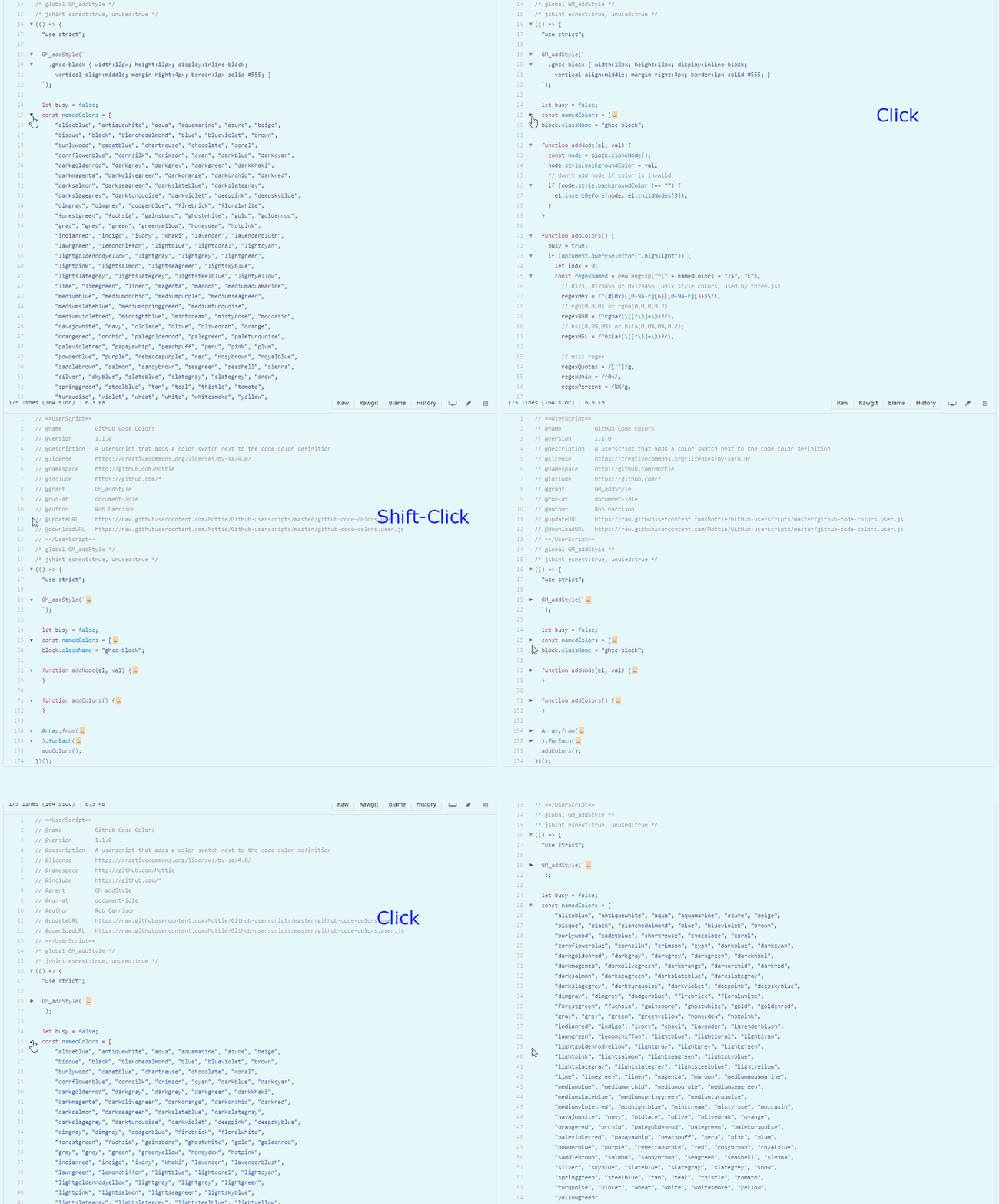
  • Clicking on an arrow will collapse a section of code with the same indentation level.
  • Using Shift click on an arrow will collapse all sections of the same code indentation level.
  • After collapsing a code block, click on either the arrow (left side) or on the ellipsis (right side), to re-expand the code block.

github-code-folding

Hosted with ♥ at GitHub