BlueCat Address Manager Dynamic Tab Title

Dynamic HTML Tab Title in BlueCat Address Manager

You will need to install an extension such as Tampermonkey, Greasemonkey or Violentmonkey to install this script.

You will need to install an extension such as Tampermonkey or Violentmonkey to install this script.

You will need to install an extension such as Tampermonkey or Violentmonkey to install this script.

You will need to install an extension such as Tampermonkey or Userscripts to install this script.

You will need to install an extension such as Tampermonkey to install this script.

You will need to install a user script manager extension to install this script.

(I already have a user script manager, let me install it!)

You will need to install an extension such as Stylus to install this style.

You will need to install an extension such as Stylus to install this style.

You will need to install an extension such as Stylus to install this style.

You will need to install a user style manager extension to install this style.

You will need to install a user style manager extension to install this style.

You will need to install a user style manager extension to install this style.

(I already have a user style manager, let me install it!)

نووسەر
Marius Galm
Daily installs
0
Total installs
6
Ratings
0 0 0
وەشان
6
Created
2018-02-20
Updated
2018-06-05
Size
3.25 KB
مۆڵەت
MIT
Applies to

Hello to all BlueCat Administrators out there.

Have you ever opened a lot of tabs and completely lost overview about where to click? Here is a script that can help you out by check the sites syntax and adding a dynamic name to the tab title for the object currently shown in the tab.
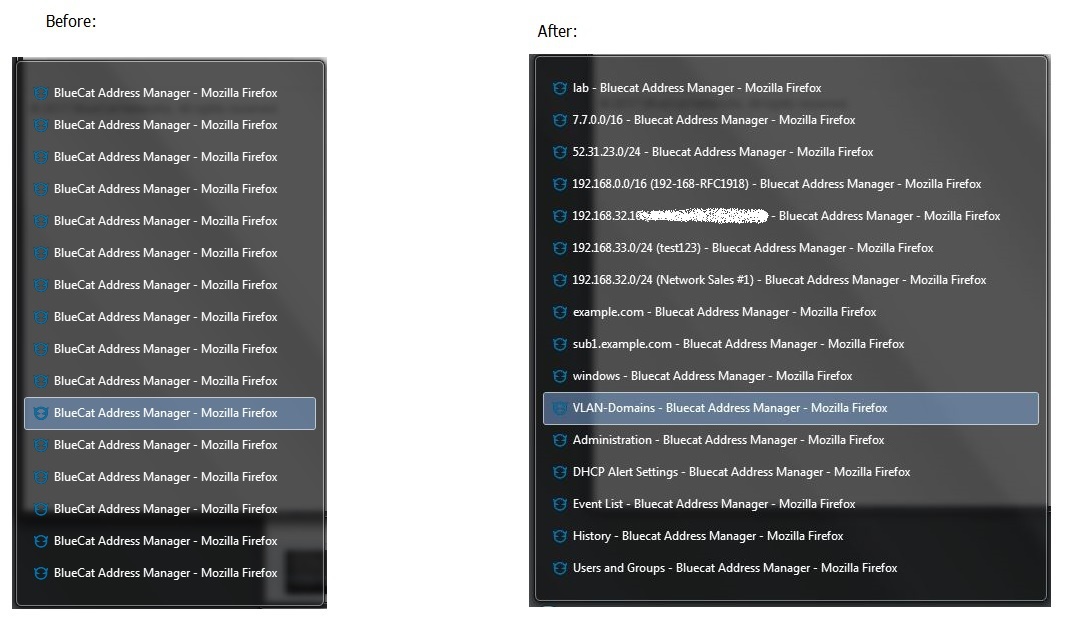
Here a picture worth a thousand words

- updated to incorporate the product version and sub-tab information on the configuration page -